# Styling textboxes for validation
**URL:** https://community.stadium.software/community/t/styling-textboxes-for-validation/171
**Category:** How To
**Created:** [July 7, 2022, 12:19pm UTC](https://community.stadium.software/community/t/styling-textboxes-for-validation/171 "2022-07-07T12:19:58Z")
**Posts on this page:** 4
**Page:** 1
### Author:  [@shamima](https://community.stadium.software/community/u/shamima)
#### Post date: [July 7, 2022, 12:19pm UTC](https://community.stadium.software/community/t/styling-textboxes-for-validation/171/1 "2022-07-07T12:19:58Z")
#### Prerequisite:
Get started with regex validation: [Regular expression validations on textbox](https://community.stadium.software/community/t/regular-expression-validations-on-textbox/168)
#### Description:
- We will analyze the existing validation styles in CSS in textboxes using built-validation
- We will analyze how a textbox without any validation is rendered
- We will do a regex validation - amount validation
- We will style our textbox using existing CSS validation styles based on the regex check result.
* * *
#### Analysing the existing validation styles in CSS when built-in validation used
Along with validating data entered by users, you may also need to style the textboxes to grab users’ attention. In stadium, we provide a few built-in validations. Hence, we have some CSS styles available for error validation also. Let’s have a look at them first so that we can use them.
- Drag and drop a textbox on the canvas
- In the properties window, check _ **AmountValidator** _ in **Validations** section
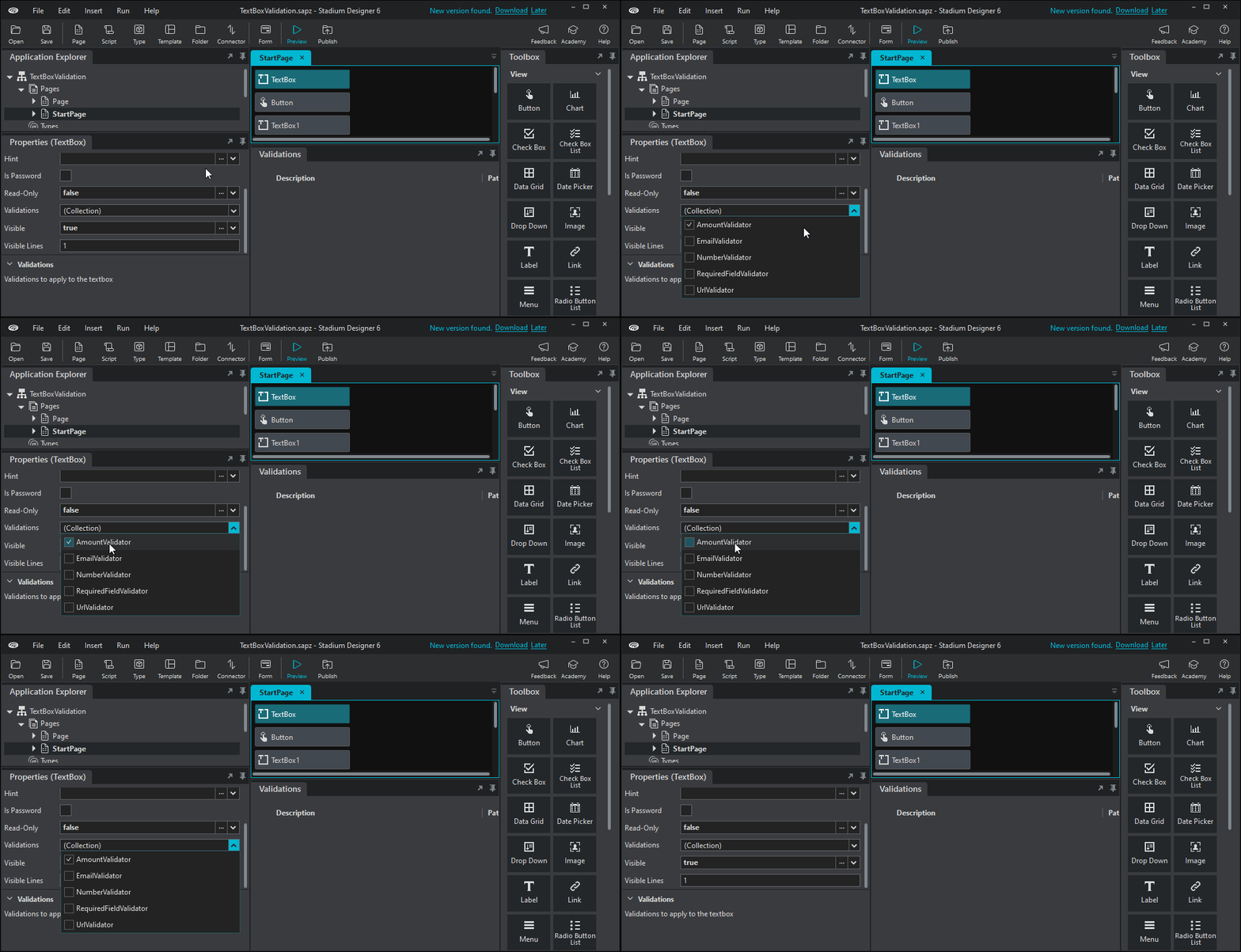
- Click on preview and inspect the textbox using CTRL+SHIFT+J
#### Let’s have a look at how a textbox is rendered in Stadium when we add amount validator to it at design time.
##### Textbox without validation error message
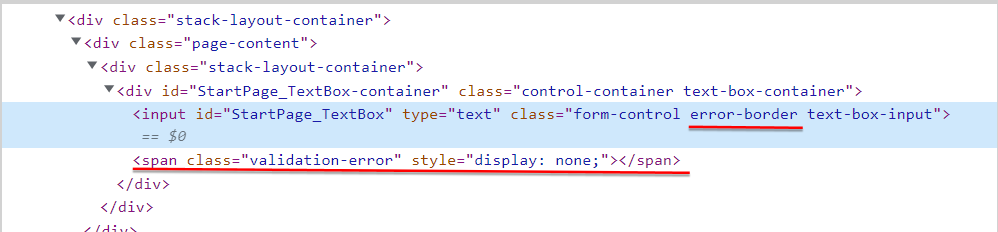
- Now type in abc in the textbox and let`s see inspect the textbox again with the new css styling which has error in it
* * *
##### Textbox with validation error message

#### Important note
> #### We can see that textboxes in designer are rendered with classes _ **error-border** _ and a span with class _ **validation-error** _
If we closely analyze the classes in section **Textbox with validation error message** above, you will see that the class _ **has-validation-error** _ has been added to the div containing the textbox when showing the error message.
We will add the class _ **has-validation-error** _ to apply the different validation styles to the div containing our textbox. The div id is _ **StartPage\_TextBox-container** _
* * *
#### Adding our validation code
**Steps;**
- Create a new application
- Drag and drop a textbox, a label, and a button on the canvas
- Select the button to open its properties
- Set its Text to _Regular Expression Check_
- In the button properties, click on Create EventHandler. This will open the _Button.Click Page_
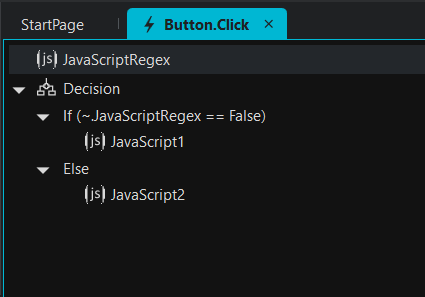
- Drag and drop a _ **javascript** _ action on the page
- Enter the following code that will allow the search for a direct match on the text entered in the textbox.
**The following regex checks for numbers 1 to 10 and return True or False**
```auto
const regex = new RegExp('^([1-9]0?)$');
return regex.test(TextBox.Text);
```
- Drag and Drop a Decision action below the javascript
- Enter the following in the _ **Conditions part** _
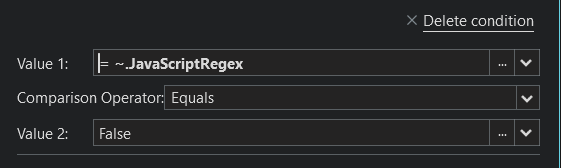
- Drag and drop a javascript action in the _ **if section** _
- Paste the following code
```auto
document.querySelector('#StartPage_TextBox-container span').innerHTML='Enter a valid amount (1-10)';
document.querySelector("#StartPage_TextBox-container").classList.add("has-validation-error");
document.querySelector('#StartPage_TextBox-container span').style.display = "block";
```
- Drag and drop a javascript action in the _ **Else section** _
- Paste the following code
```auto
document.querySelector("#StartPage_TextBox-container").classList.remove("has-validation-error");
document.querySelector('#StartPage_TextBox-container span').style.display = "none";
```
* * *
You can now preview your app! Enter values and press the button to perform validation check.
#### Sample
[TextBox Validation.sapz](https://community.stadium.software/community/uploads/short-url/k0L50UqGOnWYpGzk7t2urns0mcs.sapz) (7.0 KB)
---
### Author:  [@shamima](https://community.stadium.software/community/u/shamima)
#### Post date: [July 7, 2022, 12:20pm UTC](https://community.stadium.software/community/t/styling-textboxes-for-validation/171/2 "2022-07-07T12:20:02Z")
---
### Author:  [@shamima](https://community.stadium.software/community/u/shamima)
#### Post date: [July 11, 2022, 5:40am UTC](https://community.stadium.software/community/t/styling-textboxes-for-validation/171/3 "2022-07-11T05:40:41Z")
---
### Author:  [@Ruva](https://community.stadium.software/community/u/Ruva)
#### Post date: [August 23, 2022, 9:51am UTC](https://community.stadium.software/community/t/styling-textboxes-for-validation/171/4 "2022-08-23T09:51:45Z")
If the textbox does not have any of the builtIn validations applied, the button will be blocked if there is a validation error on the textbox after the first first click. Using the span when rendering the textbox with error will prevent this from happening. Like this:
document.querySelector(“#StartPage\_TextBox-container span”).classList.add(“has-validation-error”);
instead of this:
document.querySelector(“#StartPage\_TextBox-container”).classList.add(“has-validation-error”);