# Regular expression validations on textbox
**URL:** https://community.stadium.software/community/t/regular-expression-validations-on-textbox/168
**Category:** How To
**Created:** [July 5, 2022, 3:23am UTC](https://community.stadium.software/community/t/regular-expression-validations-on-textbox/168 "2022-07-05T03:23:27Z")
**Posts on this page:** 7
**Page:** 1
### Author:  [@shamima](https://community.stadium.software/community/u/shamima)
#### Post date: [July 5, 2022, 3:23am UTC](https://community.stadium.software/community/t/regular-expression-validations-on-textbox/168/1 "2022-07-05T03:23:27Z")
#### Objective:
Regular expression validation on textbox
#### Scenario:
As the user enters a text in the textbox and clicks on the button \*Regular Expression Check, we will display the result in a Label.
We are going to call the constructor function of the [`RegExp`](https://developer.mozilla.org/en-US/docs/Web/JavaScript/Reference/Global_Objects/RegExp) object for this example.
#### Steps:
- Create a new application
- Drag and drop a textbox, a label, and a button on the canvas
- Select the button to open its properties
- Set its Text to _Regular Expression Check_
#### Adding the regular expression validation check on the Button Click event
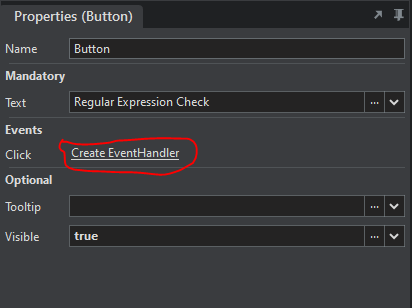
- In the button properties, click on Create EventHandler. This will open the _Button.Click Page_
\
- Drag and drop a _ **javascript** _ action on the page
- Enter the following code that will allow the search for a direct match on the text entered in the textbox.
```auto
const regexExpression = new RegExp(/d(b+)d/g);
return regexExpression.exec(TextBox.Text);
```
#### Let’s display the result in the Label
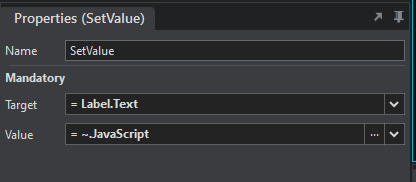
- Drag and drop a _SetValue_ action below the javascript. Set its _ **properties** _ as below
#### Let’s test
- Preview the application
- Enter **cdbbdbsbz** in the textbox and click on the button **Regular Expression Check**. This will display the result **[“dbbd”,“bb”]** in the Label.
#### Sample
The sample shows Regex validation using exec and test functions.
[Regex Demo.sapz](https://community.stadium.software/community/uploads/short-url/nmsOhRQehQbyzJRTChAGXv6BQID.sapz) (10.1 KB)
#### You want to style your textbox upon validation:
> [@Styling textboxes for validation](https://community.stadium.software/community/t/styling-textboxes-for-validation/171):
>
> Prerequisite: Get started with regex validation: [Regular expression validations on textbox](https://community.stadium.software/community/t/regular-expression-validations-on-textbox/168)Description: We will analyze the existing validation styles in CSS in textboxes using built-validation We will analyze how a textbox without any validation is rendered We will do a regex validation - amount validation We will style our textbox using existing CSS validation styles based on the regex check result. Analysing the existing validation styles in CSS when built-in validation used Along with v…
---
### Author:  [@shamima](https://community.stadium.software/community/u/shamima)
#### Post date: [July 5, 2022, 3:23am UTC](https://community.stadium.software/community/t/regular-expression-validations-on-textbox/168/2 "2022-07-05T03:23:37Z")
---
### Author:  [@shamima](https://community.stadium.software/community/u/shamima)
#### Post date: [July 5, 2022, 7:21am UTC](https://community.stadium.software/community/t/regular-expression-validations-on-textbox/168/3 "2022-07-05T07:21:05Z")
---
### Author:  [@shamima](https://community.stadium.software/community/u/shamima)
#### Post date: [July 5, 2022, 7:21am UTC](https://community.stadium.software/community/t/regular-expression-validations-on-textbox/168/4 "2022-07-05T07:21:59Z")
---
### Author:  [@shamima](https://community.stadium.software/community/u/shamima)
#### Post date: [July 5, 2022, 7:22am UTC](https://community.stadium.software/community/t/regular-expression-validations-on-textbox/168/5 "2022-07-05T07:22:10Z")
---
### Author:  [@Jeanre\_Vermaak](https://community.stadium.software/community/u/Jeanre_Vermaak)
#### Post date: [July 5, 2022, 8:25am UTC](https://community.stadium.software/community/t/regular-expression-validations-on-textbox/168/6 "2022-07-05T08:25:22Z")
Thanks guys, this post really helped out a lot.
---
### Author:  [@Jeanre\_Vermaak](https://community.stadium.software/community/u/Jeanre_Vermaak)
#### Post date: [July 5, 2022, 8:43am UTC](https://community.stadium.software/community/t/regular-expression-validations-on-textbox/168/7 "2022-07-05T08:43:55Z")
If you would like to validate a string using JavaScript and regular expression, you can use the .test function which will return a true or false value.