# Does the Preview mode accept non localhost connections?
**URL:** https://community.stadium.software/community/t/does-the-preview-mode-accept-non-localhost-connections/245
**Category:** Uncategorized
**Created:** [January 8, 2024, 11:34pm UTC](https://community.stadium.software/community/t/does-the-preview-mode-accept-non-localhost-connections/245 "2024-01-08T23:34:58Z")
**Posts on this page:** 5
**Page:** 1
### Author:  [@Ferula](https://community.stadium.software/community/u/Ferula)
#### Post date: [January 8, 2024, 11:34pm UTC](https://community.stadium.software/community/t/does-the-preview-mode-accept-non-localhost-connections/245/1 "2024-01-08T23:34:58Z")
As in Connections that are not from the same physical device but on the same local network still?
My main goal is to try out Stadium for creating a personal knowledge base that integrates with an LLM Model.
Working towards that I though it’d be fun to make a Cards Against Humanity or Apples to Apples style game. Where each user will have their own page for displaying their hand on device. the cards will be AI Generated. This would all be on a single local network. Each person would view from their own device, then a screen placed physically in the center would display the hands, so on and so forth. The issue I’m running in to is that I can not seem to connect to the Stadium Webpage from another device on my local network.
Is this not possible using the Preview mode?
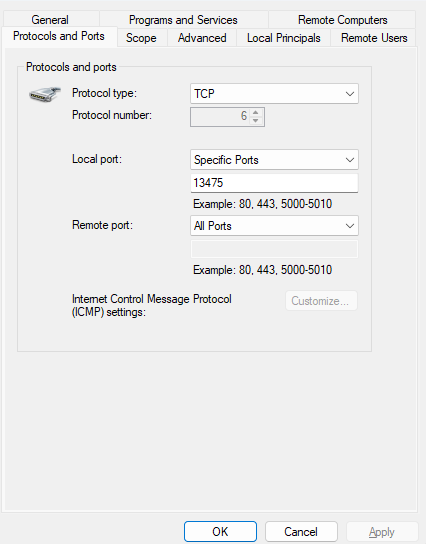
I have allowed the Randomized Ports("That was a bit frustrating to discover to be honest" **Edit** Realized I can manually assign the port for preview, Woops. Might help to ass this in to the docs under the application designer settings section.) and the program itself for inbound and outbound connections under the windows firewall manager.
Any Assistance would be appreciated.
---
### Author:  [@dawie.botes](https://community.stadium.software/community/u/dawie.botes)
#### Post date: [January 10, 2024, 5:56am UTC](https://community.stadium.software/community/t/does-the-preview-mode-accept-non-localhost-connections/245/2 "2024-01-10T05:56:05Z")
Hi Joshua,
Preview is not really meant for multiple user or device access. It’s meant for you as user to test your design before deploying to a server. You could set up the firewalls etc, for the port number, but for that your network team should be able to assist.
If you’re interested in testing on a server, we can set up a cloud server for you.
Best regards,
Dawie
---
### Author:  [@Ferula](https://community.stadium.software/community/u/Ferula)
#### Post date: [January 11, 2024, 8:23am UTC](https://community.stadium.software/community/t/does-the-preview-mode-accept-non-localhost-connections/245/3 "2024-01-11T08:23:38Z")
Awkwardly enough. I’m actually a solo hobbyist developer.
I correctly set up the firewall to allow the correct ports through under windows 11.
Was not getting any response though when trying to connect from another device.
---
### Author:  [@shamima](https://community.stadium.software/community/u/shamima)
#### Post date: [January 24, 2024, 8:00am UTC](https://community.stadium.software/community/t/does-the-preview-mode-accept-non-localhost-connections/245/4 "2024-01-24T08:00:49Z")
Just to help others with how to manually set preview port:
[https://community.stadium.software/community/t/customising-the-preview-port/246](https://community.stadium.software/community/t/customising-the-preview-port/246)
For the time being, like @Dawie said, it’s only for users to test design before deploying to a server. We’ll work on the port preview in the future to have it as a deployment port as well. We’ll keep users updated.
---
### Author:  [@Ferula](https://community.stadium.software/community/u/Ferula)
#### Post date: [February 9, 2024, 2:59pm UTC](https://community.stadium.software/community/t/does-the-preview-mode-accept-non-localhost-connections/245/5 "2024-02-09T14:59:03Z")
For anyone else coming across this issue while attempting to test locally. Using the windows firewall you can’t set to accept any connections inbound and outbound using the application as the specifier. You have to select the inbound port manually to be allowed inbound and outbound.