# Customising the preview port
**URL:** https://community.stadium.software/community/t/customising-the-preview-port/246
**Category:** How To
**Created:** [January 10, 2024, 11:35am UTC](https://community.stadium.software/community/t/customising-the-preview-port/246 "2024-01-10T11:35:15Z")
**Posts on this page:** 3
**Page:** 1
### Author:  [@shamima](https://community.stadium.software/community/u/shamima)
#### Post date: [January 10, 2024, 11:35am UTC](https://community.stadium.software/community/t/customising-the-preview-port/246/1 "2024-01-10T11:35:15Z")
Sometime we need to change the default preview port to a specific port. The good news is that Stadium allows the customisation of the preview port.
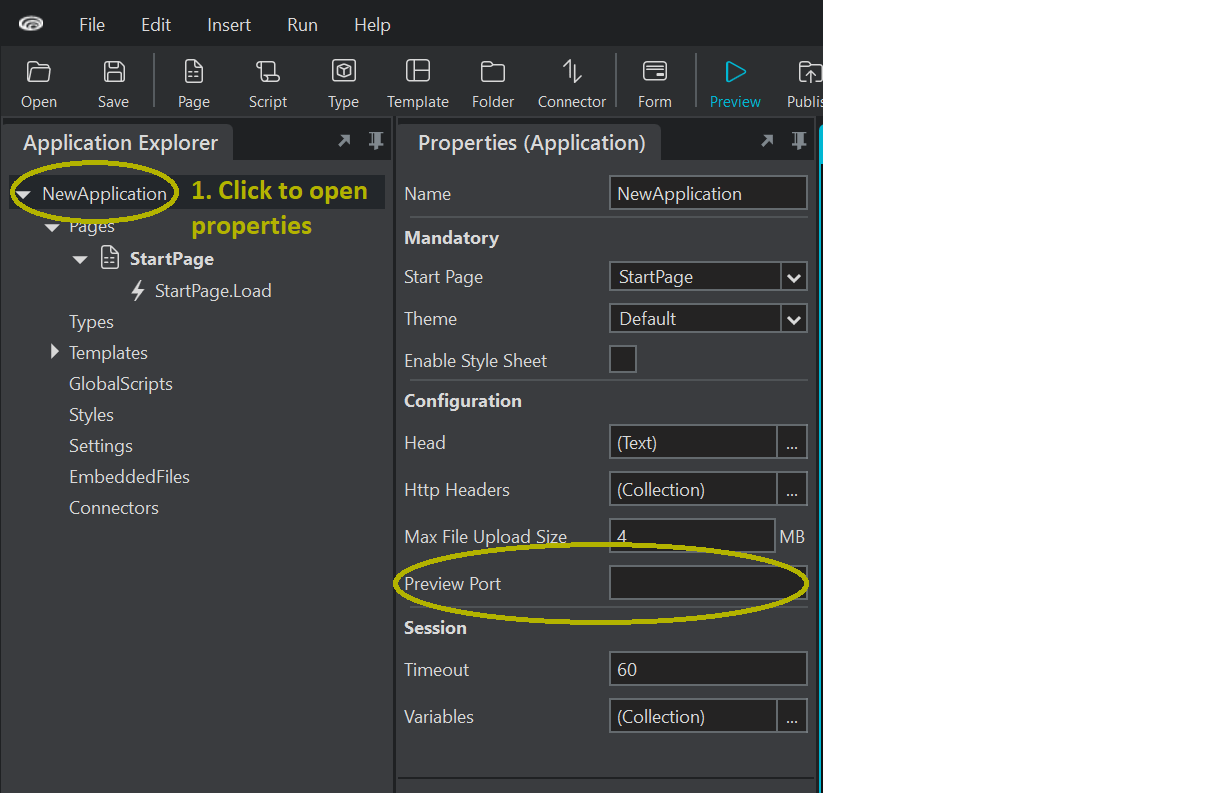
The following step will allow you to customise the preview port.
1. Click on the application in the Application Explorer to open the application properties.
2. Enter the preview port in the preview port section.
---
### Author:  [@shamima](https://community.stadium.software/community/u/shamima)
#### Post date: [January 10, 2024, 11:35am UTC](https://community.stadium.software/community/t/customising-the-preview-port/246/2 "2024-01-10T11:35:31Z")
---
### Author:  [@shamima](https://community.stadium.software/community/u/shamima)
#### Post date: [January 24, 2024, 7:57am UTC](https://community.stadium.software/community/t/customising-the-preview-port/246/3 "2024-01-24T07:57:55Z")